Showing posts with label Search Marketing. Show all posts

Eight ways content marketing and SEO can work together

Content marketing
Content marketing

Since the rise of the term content marketing, perhaps three or four years ago, there’s been plenty of talk about the end of SEO and its replacement by this ‘new’ discipline.
It’s true that many search agencies have since rebranded or have emphasized their content expertise, but this doesn’t mean that content marketing has rendered SEO obsolete. Far from it. Indeed, the two disciplines should work together, and the use of either has to include both SEO and content if it is to be truly effective online.

Key differences between content marketing and SEO 

SEO and content marketing overlap, but there are key differences.
  • Aspects of SEO are more technical. This includes the use of correct URLs, title and ALT tags, sitemaps and so on: the stuff that underpins your content marketing strategy.
  • Content marketing is broader and isn’t necessarily confined to SEO goals. For example, a publisher should produce excellent content first and foremost as a way of attracting and retaining an audience.

How content and SEO can work together 

There is a school of thought, or at least the perception exists in some quarters, that SEO is merely about creating good content for the search engines to index.
While I’m all for the quality content part, there’s more to it than that. If you haven’t ensured that the on-site SEO groundwork has been done, your content efforts will be wasted.
For example, if your site has a penalty, or Google isn’t indexing pages properly, then you’re going to need some SEO expertise, great content or not. This is why the SEO experts and content teams need to work together. As the stats below show, this isn’t necessarily happening all the time, butthere is a desire for closer collaboration.
Here are some ways SEO and content can work together:

1. Creating original, quality content  

While thin content created to provide fodder for Google’s crawlers may have worked to a certain extent a few years ago, it isn’t effective now. Also, weak content produced to make up the numbers will not work from a content marketing perspective, as it will not help to attract and retain readers.
Instead, from an SEO perspective, original and engaging content will set you apart from competitors, as it gives the search engines something to index that can’t be found elsewhere. It also helps your content marketing goals, as original and quality content is far more likely to attract the audience you’re targeting.
Ask yourself whether your content inspires people to linger on your site longer than a minute or so. Does it provide value, such as useful advice that helps them to do their jobs better?

2. Evergreen content and SEO 

Creating evergreen content is a great strategy for improving search rankings, as well as making your site a more useful one. A piece of news will often do well in Google while it’s fresh topical, but will fade thereafter. It doesn’t deliver long-term traffic. However, a more useful article that contains valuable advice and insight will attract the kinds of links and engagement metrics that Google is looking for, and is more likely to perform well in the search rankings over a longer period of time.
If you can get this right, it’s a virtuous circle, as higher search rankings means more visits to the article, which then leads to more links, better rankings and so on. One example of evergreen content from Search Engine Watch illustrates this point; this article on writing title tags for SEO is from 2012, but is still useful to readers and attracts plenty of traffic.
It also ranks at No. 1, or in the top three for searches around writing title tags and SEO.
he useful content helps it rank in the first place, but this high ranking means that the article continues to deliver traffic to SEW. It’s great when it works like this.

3. Keyword research  

Keyword research is essential for content marketing and SEO to work well together. First of all, the quality has to be in the content you produce, but you should also ensure that the content you spent time creating achieves the exposure it deserves. To achieve this, your content needs to match the search terms that people are using and answer these search queries effectively.
If you use too many technical terms in your articles, this language may not match that which searchers are using. To avoid this, do some keyword research to find out which terms are popular and match the language you use to the way people search
Soovle, shown below, is a good tool for quick idea generation, but there are plenty of other SEO tools available.

4. Monitoring keyword goals

Once you have a list of terms and phrases to target with your content efforts, it’s important to monitor and measure your efforts. Is the content you produce hitting the mark? Is it having an effect on search positions? Don’t expect overnight results; it can take time before you see any shifts in search, and it may be very competitive for certain keywords.
There are no guarantees of success, but a well-applied strategy using focused content will pay off on a long term basis. It’s important to add that, while content can play a key role in achieving SEO goals, it shouldn’t be a slave to those goals. Keywords shouldn’t be crowbarred in so that content quality is affected. The reader shouldn’t notice too much.

5. Link building

Good content attracts links. Just make sure it’s distributed effectively so that it can get the attention of as big or influential an audience as possible. There’s no great science to this; just create content that people will want to link to and see how it works.
On my last site, good posts would generally get between 200 and 1,000 backlinks. However, the odd one received more than 10,000. They weren’t necessarily the most popular posts, either. If I knew the secret, I’d bottle it.
We can see how evergreen SEW articles have attracted impressive numbers of backlinks. This article on Excel shortcuts and tricks fits the bill in terms of being a useful resource for marketers, and has therefore attracted plenty of links, as Majestic data shows.

6. Internal linking

This is an obvious way to use content to help with SEO goals, as well as improving the user experience. Internal linking can help Google crawl your site more effectively, help pages to rank well for certain search terms, and also point users toward content that is relevant to the article they’re reading.
It’s simple enough to put into practice, and should be a part of the thinking when writing and editing content.

7. Measurement

It’s vital to measure the effects of the content you create in terms of SEO goals. If you’re aiming to improve rankings, there are some useful tools out there to track changes in ranking positions and see the results of your efforts.
You can also use analytics to see how the volume of search traffic changes over time, and which pages and articles are most effective for this.
Content marketing metrics should be applied too. If you’re creating the kind of content that is valuable to your target audience, then metrics such as bounce rates, time on site, and visitors viewing multiple pages should be moving in the right direction.

8. Headlines 

Headlines are very important. They should be descriptive and should work hard to convince people to click, but they shouldn’t try too hard. For example, a title such as “10 useful tips to improve your landing pages” is fine, as long as those tips are useful and deliver on the promise. However, “10 awesome tips that will improve your landing pages and make you a millionaire” might be promising more that it can deliver.
Headlines must be written for the Web, and you need to consider the keywords and phrases you use in headlines. How do people search for these topics? How will people find your articles? What do you want to rank for?
Headline length is important too. It shouldn’t be too long, for a number of reasons.
  • Google truncates long titles in search results. You want the full headline to be visible in the search results so people are more inclined to click on it.
  • Social sharing. For example, if you want people to share your articles on Twitter, the headline should be short enough to allow people to retweet without having to edit it, or to add a comment if they want.
  • Emails. If it’s going in a newsletter, especially as the headline, the title should be visible in the subject line.

In Summary

SEO and content are distinct disciplines that require different skills and knowledge, but the success of each depends on the other. Content teams should be writing with a knowledge and understanding of SEO goals, ensuring that basics such as internal linking, headline optimization and use of keywords are covered.
To repeat my previous point, the quality of the content is all important and should not be compromised by SEO goals, but it is perfectly possible to write naturally while fulfilling the SEO work. In turn, SEO teams should be working with content creators, ensuring that they are aware of the basics, and helping to set goals which can be achieved through content.

7 essential Google Analytics reports every marketer must know

Google Analytics


For marketers, there are few skills more important than a deep understanding of Google Analytics and its conversion measurement capabilities.
After all, this is the tool that tells you whether your efforts are actually translating into results.
Unfortunately, mastering Google Analytics can be challenging, even for experienced marketers. There is far too much data and too few easy-to-follow dashboards to sort it out.
To help you out, I’ve put together a list of seven custom and standard reports you can use right away to get better insight into your marketing performance.

1. Mobile Performance Report

You know this already: Ours is a mobile-first world. The total number of mobile users now exceedsthe total number of desktop users…
2016-05-27_11-08-37
… and mobile e-commerce is nearly 30 percent of all e-commerce in the US.
2
In fact, mobile is so important now that Google even penalizes websites that are not mobile-friendly.
For marketers, knowing how their sites perform on smaller screens is vital to staying alive in the SERPs and winning over customers.
The mobile performance report shows you how well your site (not app) is optimized for mobile and where you need to make improvements.
You can even segment the report further to see which mobile devices/browsers customers are using to access your site. This will tell you if your site is performing poorly on some devices.
Accessing this report is easy: Just go to Audience -> Mobile -> Overview.
3
This will show you how your site does on different platforms:
4
You can add more dimensions here as you see fit. Take careful note of bounce rate, time on site and page views to see whether your user experience is failing on one or more mobile channels.

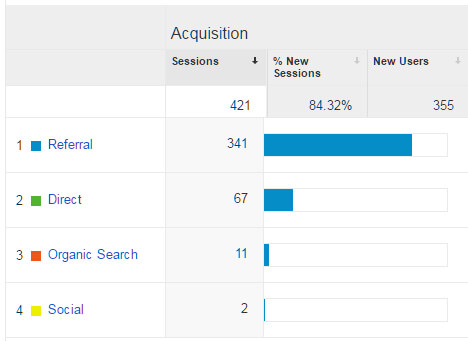
2. Traffic Acquisition Report

Want to know if people are actually clicking on your ads? That guest post you published earlier — is it generating any traffic to your website? How about your SEO strategy? Is it actually working?
The traffic acquisition report will tell you all this and more. For many marketers, this will be their first step in the reporting process.
This is a standard report, so you can find it by going to Acquisition -> Overview.
5
This will give you a quick breakdown of your traffic sources.
6
Of particular insight here is the “Referrals” tab (Acquisition -> Overview -> All Traffic -> Referrals). This will tell you which external sites are driving traffic to your site.
7
Clicking on a referring website will show you the exact pages visitors used to enter your site.
8

3. Content Efficiency Report

Do you generate a lot of content on your website and find that tracking it is getting a little overwhelming?
Avinash Kaushik, author of Web Analytics 2.0 and a Digital Marketing Evangelist at Google, created this report to solve this exact problem.
This report tracks entrances, page views, bounces and goal completions to help you answer questions like:
  • Which content is engaging your audience the most?
  • What type of content (images, videos, GIFs, infographics, reviews) performs best with your readers?
  • Which content converts readers into customers?
  • Which content is shared most by your users?
Here’s a quick overview from Avinash himself:
9
You can get a more detailed explanation of the report here. To grab a copy for yourself, check thislink (you’ll need to log into Google Analytics first).

4. Keyword Analysis Report

Getting organic traffic from Google is great. Unfortunately, ever since Google started encrypting search data in 2012, your organic traffic keyword report has mostly shown this:
10
However, you can still gain a ton of insight about your visitors by tracking the performance of unencrypted keywords.
This report created by eConsultancy analyzes the most popular (and available) incoming keywords to your site. It shows visitor metrics, conversion rates, goal completions and page load time for each keyword.
11
Use this data to figure out what keywords are working best for you, how many of them are actually contributing to your goals and what keywords you need to optimize for in the future.

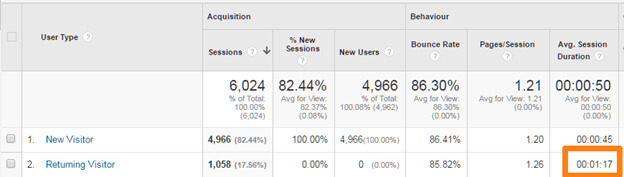
5. New vs. Returning Visitors

Getting a user to come to your site for the first time is great. Getting them to visit again is even better. After all, it is the returning visitors who usually end up becoming readers, followers and customers.
This standard report in Google Analytics will tell you what percentage of your users are coming back to your site.
You can find it by going to Audience -> Behavior -> New vs. Returning in your Analytics account.
12
Usually, the metrics for new and returning visitors are quite different. Returning visitors tend to stick around longer and have lower bounce rates.
13

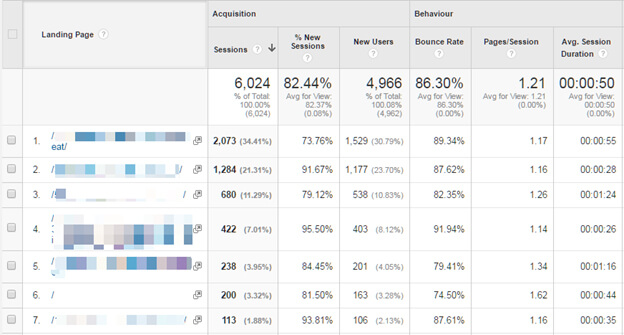
6. Landing Pages Report

Your users will enter your site from all sorts of pages. Some will type in your home page URL directly, some will find a page through search engines, and some others will click on a link shared on your Twitter feed.
This report will tell you which pages visitors are landing on when they first enter your site. Based on data from this report, you can figure out how users are interacting with your site.
For example, if the report shows that some pages have a substantially higher bounce rate than others, you can take steps to make high bounce rate pages more engaging.
Find the report – Behavior -> Site Content -> Landing Pages.
14

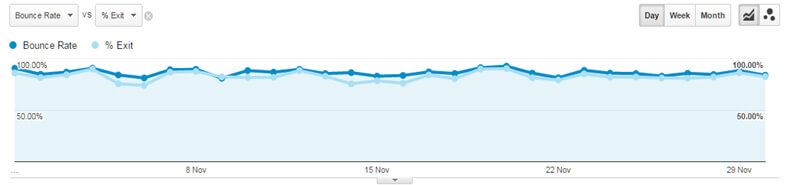
7. Bounce Rate vs. Exit Rate Report

“Bounce Rate” is the percentage of visitors who don’t take any action and leave from the same page they landed on.
“Exit Rate” measures the percentage of your visitors who browse more than one page on your site before leaving.
This report compares the bounce rate vs. exit rate for different pages on your site.
You can find it by going to Behavior -> Site Content -> All Pages:
15
Next, select “Bounce Rate” and “% Exit” in the Explorer tab.
16
This will give you a visual comparison between bounce and exit rate for all your pages. You can drill down further to get this data for each page.
1
Use this report to find pages with low engagement and detect UX problems on your site. For example, if visitors are exiting a three-page article after reading only the first two pages, there’s probably something that is causing them to leave on the second page (too many ads, bad copy, a distracting link in the sidebar and so on).

Over to you

Google Analytics is an essential analytics tool for any marketer, but making the most of it can be challenging. By using a mixture of pre-created custom reports and standard reports, you can gain valuable insight into your users.
Google Analytics’ Solutions Gallery is particularly useful for someone new to analytics. Here, you can import expert-created reports into your Analytics account to build powerful dashboards quickly. You can also use these reports as guides to help you understand this incredible tool better.

Advice to those considering SEO as a career

considering SEO as a career

considering SEO as a career

“In my day, there was no such thing as digital marketing. You studied Comp Sci, used QuarkXpress, made magazines, and you liked it!”
I was recently asked by a colleague to present on “How to break into a career in SEO” to students in her college-level advertising course. As I planned my presentation, I actually found it a difficult topic to advise on because, as I like to say, I’ve been doing SEO since there was such a thing back in the ’90s. Back then, there were no courses in digital marketing, no internships and definitely nothing like professional certifications available.
Today, there are courses available on digital marketing — but even with those, is a formal education really what impresses me as a hiring manager? And what should someone interested in SEO know about pursuing a career in the field?
In today’s post, I thought I’d tackle the questions above for the benefit of those entering the SEO job market, to help guide them in their exploration of the (potentially) lucrative and exciting world of SEO.

Starting a career in SEO

My intent is not to tell you the right job boards to watch; it is to tell you the things a digital marketing agency or business are likely looking for in an entry-level SEO hire.
Would it be good to have an official degree in digital marketing, communications or computer science? Sure. But would it be enough to impress the manager and beat out others with a similar degree? Perhaps, but not likely. What is likely to make a difference?
  • Your actual skill set. Give me someone who knows SEO basics, can read or code HTML, is a good writer and can have an intelligent conversation any day over someone who “only” has a degree. If you have some familiarity with analytics, even better.
  • An ability to be client-facing. Of course, you can’t merely just depend on your skills — that’s only half the job. The other half is communicating what’s important to stakeholders. This means being able to talk about big-picture business objectives, not just about how cool AngularJS is.
  • Any work history (job or internship) that involves working on a website, or even an offline publication. It could be that you’ve worked in tech as an editor, a copywriter, a general marketing assistant, posting photos to social media, or something else. This is valuable as long as it shows you’ve worked on a team. Yes, I know there’s a catch 22 — to get a job, you need experience, but to get experience, you need a job. But your ability to show you’ve worked with others in some form of media is important. It’s not often I need a knowledgeable hermit… I need someone who will show up every day and be able to complete assignments.
  • No job history? Hone your skills on your own. I know there’s only so much a classroom can teach and only so much experience you can have walking into an entry-level opportunity. Those who will succeed in SEO are self-starters and, by nature, curious. A good signal that you, as a job candidate, have those skills is by showing that you’ve developed a website or a blog on your own with some specific focus. Maybe it’s a Tumblr site with crafting how-tos; perhaps it’s a fully developed travel blog; maybe it’s even a website for a favorite local charity or church. (And, no, just liking Facebook and “being online all the time” isn’t enough.)
  • Certifications. Any Google certifications you can get will be a huge differentiator — Google Analytics individual qualification, in particular. Also of note: SEO Training Course by Moz (free), SEO 101 by Distilled (paid) and Bruce Clay SEO training (paid).
  • An interest in/familiarity with industry blogs and thought leaders. The ability to keep up with the changes in the discipline is important — but more than that, your curiosity and willingness to learn are signaled by your self-directed “research” on sites like Search Engine Land. I will ask you what things you read and what you think is “next” in SEO.
The best way to start is by learning digital marketing “hands on.”

Is digital marketing the career for you?

Being prepared for a job is one thing, but enjoying it enough to make it a career is another. What are some of the pros and cons of working in SEO day in, day out that may determine how well-suited you are for the “SEO lifestyle?”

Pros

  • Always something new to learn — constant change. This isn’t just a cliche; something big will happen every few weeks that you must learn about. Don’t get overwhelmed thinking you have to be an instant expert, just understand that you should know why something new matters (not necessarily how it all works).
  • If you have an idea and plan to test and measure, seniority doesn’t matter. This is true of many tech-related fields. If you have a good idea, innovation or copy “hook” you think will grow traffic and revenue, only a fool for a boss wouldn’t listen just because you’re young.
  • It is a “test and learn” culture. As long as you’re watching/measuring, surprises, and even setbacks, are seen as a path to improvement.
  • Chance interact with cool people in the industry (Well, as long as you think nerdy is cool). People in digital marketing are usually an interesting bunch who are fairly laid-back and free with the knowledge they’ve gained.
  • Fly all over the world. It’s all caviar and champagne, don’t you know? Well, not really, but if you’re in an agency of any size, it’s likely you’ll make a trip or two during the year to attend a client meeting, presentation or conference.

Cons

  • Always something new to learn — constant change. The speed of change isn’t slowing, it’s accelerating. The constant need to stay informed and leave old tactics behind can be taxing.
  • Hard to maintain work/life balance. This is probably the biggest challenge — because we love it, we are thinking about or working on SEO all the time. Sometimes, bosses even think that because you think it’s cool and you’re young, it’s not really like work if they give you impossible deadlines to meet. Well, it is real work, and even if you love what you’re doing, it’s possible to burn yourself out without anyone else pushing you. Know that you are a limited resource and there will always be some reason to work late or skip a vacation. Be smart, and get off the computer as often as you can.
  • You won’t be management overnight. Sweet SEO skills alone won’t make you a manager, director or VP — it’s your ability to communicate, maintain an even temperament and focus on client needs (not SEO tech-ery) that will help you rise up the ranks. Those things are only gained over time and in situ.
  • Clients and CEOs can have unreasonable expectations. There are definitely those who think SEO is like magic, and, if you just sprinkle some on their project, success will come overnight. Even with guidance, patient counseling and careful presentation of progress, you sometimes cannot reset those unreasonable expectations. This is closely related to the next item…
  • Many have misconceptions about how SEO works. Part of what makes SEO cool is that a lot of people don’t really know what you do or how SEO works. But that can also be dangerous; they may have misconceptions about the level of skill required to execute a good SEO campaign or the time it takes to see results.
  • You’re likely to step on toes. While it may be tempting to jump into a new project and start ordering SEO-based code changes or say that it’s SEO’s job to provide the language used in copy development, be aware that there are likely IT and PR departments in the room who think those things are their job. My advice: Before calling their baby ugly, always acknowledge the necessary role of IT to provide a good code base and/or PR to craft the brand’s message — then explain how SEO can enhance, not replace, their work.

Final thoughts

Is SEO for everyone? Definitely not. If you like learning a way of doing things that you can execute until retirement, don’t get into the field. If you like figuring out the way things work — and you can recognize when talking about your SEO ninja skills should take a back seat to the business needs of the project — then jump in and stay humble.

Google says page speed ranking factor to use mobile page speed for mobile sites in upcoming months

blogging

page speed of your mobile pages

Gary Illyes from Google said at the Search Marketing Summit today in Sydney that Google will be updating the page speed ranking factor to specifically look at the page speed of your mobile pages when it comes to the mobile-friendly algorithm.
This report came from Jennifer Slegg, who said Gary Illyes from Google said this is months, but not years away from happening.
The issue today is that many of the ranking signals Google uses today for mobile rankings are based on your desktop web pages, not mobile web pages. So if you have a really fast desktop web page, but the mobile version is really slow, it currently doesn’t hurt your mobile rankings.
When Google updates their mobile-friendly algorithm, they hope to add mobile-specific page speed as a factor and not rely on the desktop version.
As you may remember, page speed became a ranking factor back in April 2010. In June 2013, Matt Cutts hinted that a negative factor would come to slow mobile pages. Then a year ago, Gary Illyes said they are working on mobile-specific page speed, and now, he said it is months away.
But Gary also said on Twitter it is in the planning phase, so hopefully, it is still months away.
It is just logical for page speed, as well as other factors, to be mobile-dependent and not desktop-dependent. This seems to be Google’s plan.